 Yin Yang Launcher
Best Minimalist Launchers for Android (2026)
Five minimalist Android launchers compared for 2026: our pick for customization, everyday widgets and digital wellness in one launcher, and the best choice for the simplest home screen, one-handed use, quieter notifications and scheduled blocking.
Updated October 2026 · Written by Rolet Fernandes, who builds Yin Yang Launcher
The best minimalist launcher for Android depends on what you want from it. If you want a minimalist home screen you can personalize, your everyday widgets close at hand and built-in digital wellness tools, all in one launcher, our pick is Yin Yang Launcher. If you want the plainest possible home screen, choose Olauncher. Niagara Launcher suits a one-handed list layout, Before Launcher is built for quieter notifications, and minimalist phone covers scheduled blocking and short-video restrictions. None of the five shows ads.
We build Yin Yang Launcher. The other four are described from their current Play listings and help pages, checked in October 2026.
The five at a glance
| Launcher | Best for | Home screen | Widgets | Digital wellness | Pricing model |
|---|---|---|---|---|---|
| Yin Yang Launcher | Customization, widgets and mindful phone use | Icons or text list, layouts, clocks, fonts, wallpapers, icon packs | Yes, one swipe away in My Space | Usage insights, Mindful Pause, daily time budgets, Focus Mode, Mindful Break | Core features available without payment; Pro adds more widgets, more looks and stronger wellness tools |
| Olauncher | The plainest home screen | Text list, no icons | No | None | No in-app purchases |
| Niagara Launcher | A one-handed list layout with strong theming | One-handed list, icons, themes | Yes | Usage reminders, notification summary | Free version + Pro (yearly or lifetime) |
| Before Launcher | Quieter notifications | Text-first list | Its own wellness widgets | Unlock counts, notification filter | Free version + one-time Pro |
| minimalist phone | Scheduled blocking and short-video restrictions | Icon-free list, themes and fonts | No Android widgets | App, website and short-video blocking on schedules | Paid after a 7-day trial (monthly, yearly or one-time) |
What is a minimalist launcher?
A minimalist launcher is an app that replaces your Android home screen with a simpler one: fewer icons, often a plain list of app names, and less pulling at you when you pick up the phone. On Android you can swap the whole home screen this way, and you can switch back to your old one at any time from Settings.
Minimalist launchers differ in what they keep. Some keep almost nothing. Others keep your widgets and notifications in a tidier layout. A third group adds digital wellness tools, and those vary too: some show where your screen time goes, some add a pause before an app opens, some set time limits or focus sessions, and some block apps on a schedule. Different habits suit different tools, so it helps to know which ones you want before you choose.
Which minimalist launcher lets you personalize your phone and use it less?
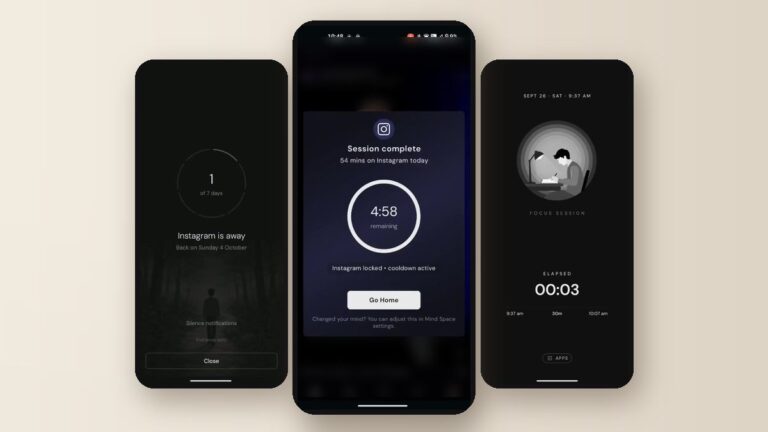
Yin Yang Launcher gives you a home screen you can style the way you like, keeps your calendar, notes and widgets one swipe away, and adds a pause, daily time budgets, focus sessions and app breaks for the apps you want to use less. It is a minimalist launcher that helps you use your phone less.
I started building it in 2024 after losing too many afternoons to a phone I’d only picked up to check the time. I wanted a home screen that looked good and stayed simple, still had my calendar and notes, and made me stop for a second before opening Instagram. Those three things are still the whole idea.
Make the home screen yours
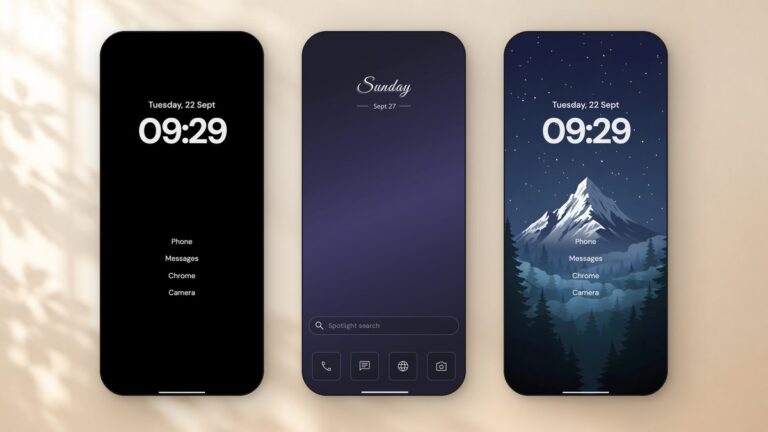
Choose the Classic layout with icons or the Minimal layout with a plain text list. Then set the look in one editor: clock style, font and size, monochrome or colour icon tints, icon packs, and a wallpaper that can be your own photo, a gradient, or a live or dynamic wallpaper, with separate wallpapers for light and dark mode. A home screen you like looking at is one you keep using, which is why personalization sits next to the wellness tools. See how in the guide to customizing your home screen.
Your day, one swipe away
Swipe right to My Space for Notes, To-dos, Calendar, Weather, App Folders and your own Android widgets, such as Google Calendar, Keep or Spotify. You check your calendar or jot a reminder without filling your home screen or opening another app. More in the My Space widgets guide.
Use your phone less, your way
Swipe left to Mind Space for five tools that cover different habits:
- Usage insights: today’s screen time, pickups and app opens, plus a 14-day trend, so you can see what is actually taking your time.
- Mindful Pause: a 10 to 60 second breathing pause before the apps you choose, so you can decide whether you still want to open them.
- Mindful Timer: asks how long you want when you open a chosen app, takes it from a daily budget you set, and can hold the app for a cooldown afterwards.
- Focus Mode: hides everything except the few apps you allow, for as long as you set, and a schedule can remind you to start at the same time each day.
- Mindful Break: takes one app away for 1, 3, 7 or 30 days, with your own reason shown whenever you reach for it.
The pause and the timer apply when you open an app from the launcher; opening it from a notification goes straight in.
Privacy and pricing
Yin Yang has no ads and needs no sign-in, and your app usage and screen-time data stays on your phone. It is rated 4.5★ on Google Play with 100K+ downloads, and it is built and updated by one developer, with new releases every few weeks.
Core features are available without payment. Pro, a yearly plan or a one-time lifetime purchase, adds:
- More widgets: extra My Space tiles such as Screen Time, Music and Steps.
- More looks: live wallpapers, extra clock styles, custom fonts and icon packs.
- Stronger wellness tools: Mindful Pause on more apps, Strict focus sessions with no early exit, and Mindful Break.
- Best for: people who want a phone that looks the way they like and helps them use certain apps less, with their calendar and notes close by.
See every Yin Yang Launcher feature, with setup guides
What is the simplest minimalist launcher for Android?
Olauncher is the simplest: a text-only home screen with the time, the date and a short list of app names. Swipe up for an alphabetical list of everything else, swipe down for notifications, and double-tap to lock.
Olauncher is open source (GPLv3), has no ads, no in-app purchases and no data collection, and it is still actively developed, with releases through September 2026. It is rated 4.8★ with 1M+ installs. You can hide apps from the list and rename them, which some people use as a nudge (renaming an app to “Do you need this?”). Customization stays basic by design: text size, alignment, a light or dark theme and daily wallpapers.
- Worth knowing: there are no icons and no widgets on the home screen, and the home list is capped at a few apps. The same developer sells a separate app, Pro Launcher, with extras such as a widgets page and a gentle interruption before time-wasting apps.
- Best for: people who want the plainest possible home screen and nothing else.
Which minimalist launcher is best for one-handed use?
Niagara Launcher is built around one-handed use: your favourite apps sit in a vertical list you can reach with your thumb, and an alphabet strip on the side gets you to the rest.
Niagara has 10M+ installs and a 4.8★ rating, and it is updated often. The April 2026 “Studio” update added Theme Studio for themes, icons, fonts and clock styles. Notifications appear inline in your list, where you can read and reply. A Wellbeing section adds Usage Breaker (a reminder when you have spent a while in an app), hidden apps and a notification summary.
- Worth knowing: most customization, the calendar and weather widgets, widget stacks and Usage Breaker are part of Niagara Pro, sold as a yearly or lifetime plan. Niagara has no app blocker or pause before opening an app.
- Best for: people who want a one-handed list layout, with themes and inline notifications.
Niagara Launcher on Google Play
Which launcher helps with notifications?
Before Launcher is the one built around quieter notifications: it silences alerts from apps you haven’t marked as important and keeps them on a separate screen you open when you choose.
Before gives you a text-first home screen on a photo, gradient or solid background, with folders, pinned apps and sorting by size, install date or last use. It now ships its own wellness widgets, including weather, battery and your average daily and weekly unlocks. Icon styles and third-party icon packs are supported. It is rated 4.7★ with 500K+ installs, and Pro is a one-time purchase that covers all your devices.
- Worth knowing: there is no space for notes, to-dos or a calendar beyond the small widgets, and hiding apps is a Pro feature.
- Best for: people overwhelmed by notifications who want a text-first home and a one-time price.
Before Launcher on Google Play
Which launcher offers scheduled blocking and short-video restrictions?
minimalist phone is an option if you specifically want apps and websites blocked on a schedule and short videos stopped inside YouTube, Instagram, Facebook and Snapchat.
It gives you an icon-free home screen with themes, fonts and app renaming, and adds blocking schedules for work, study and sleep, in-app reminders with a progress bar, a notification filter, a grayscale mode and work-profile support. It has 5M+ installs and a 4.7★ rating, and it launched on iPhone in November 2025.
- Worth knowing: since late 2025 the app is paid after a 7-day trial, with monthly, yearly and one-time plans. It doesn’t support Android widgets.
- Best for: people who want apps, websites and short videos blocked on a schedule.
minimalist phone on Google Play
If you are weighing it against other options, we compare it in detail in Minimalist Phone Alternatives.
Which minimalist launchers have no ads?
All five launchers here have no ads: Yin Yang Launcher, Olauncher, Niagara Launcher, Before Launcher and minimalist phone. Their business models differ instead. Yin Yang’s core features are available without payment, with Pro adding more widgets, more looks and stronger wellness tools. Niagara and Before sell a Pro upgrade on top of a free version, Olauncher has no in-app purchases at all, and minimalist phone is paid after a trial.
Olauncher vs Before Launcher: which is simpler?
Olauncher is simpler; Before Launcher does more with notifications. Both give you a text list instead of icons. Olauncher stops there: a few apps, the time and the date, no purchases. Before adds a notification filter, wellness widgets with unlock counts, icon packs and sorting options, with a one-time Pro upgrade. Choose Olauncher if you want the fewest moving parts, and Before if notifications are what pull you into your phone.
Can a minimalist launcher replace a dumb phone?
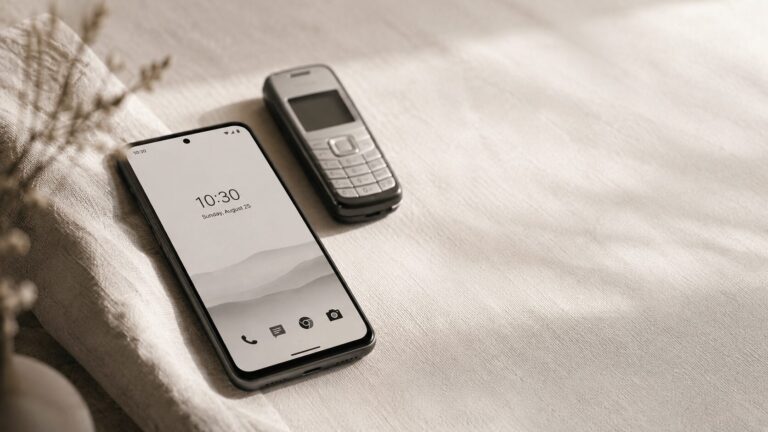
For many people, yes: a minimalist launcher can make a smartphone behave like a simpler phone while keeping maps, banking, your camera and messaging one tap away. A text-only home screen, monochrome icons and a few apps taken away for a while get you most of the way there. We cover the full setup in Can a dumb phone launcher replace a dumb phone?
How do you change your launcher on Android, and switch back?
- Install the launcher from Google Play and open it.
- When Android asks, set it as your default home app. Or open Settings › Apps › Default apps › Home app and pick it (menu names vary slightly between phone brands).
- To go back, return to the same Home app setting and choose your previous launcher. Your apps and data aren’t touched.
Our recommendation
Choose Yin Yang Launcher if you want customization, useful widgets and digital wellness in one launcher. Set up a home screen you enjoy looking at, keep your calendar, notes and widgets one swipe away, and add a pause or a daily budget to the app that takes most of your time. Give it a week and see how your screen time changes.
If you need one thing above all else, the others focus on it well: Olauncher for the plainest list, Niagara for a one-handed layout, Before for quieter notifications, and minimalist phone for scheduled blocking. Whatever you pick, your old launcher is always one setting away.
FAQ
What is the best minimalist launcher for Android in 2026?
It depends on what you want. Yin Yang Launcher is the pick if you want a home screen you can make your own, your calendar and notes one swipe away, and tools like a pause before chosen apps and daily time budgets. Olauncher is the simplest, Niagara Launcher is built for one-handed use, Before Launcher quiets notifications, and minimalist phone offers scheduled blocking and short-video restrictions.
Is there a minimalist launcher with no in-app purchases?
Yes. Olauncher is open source and has no ads and no in-app purchases.
How much do minimalist launchers cost?
It varies by app. Yin Yang Launcher’s core features are available without payment, with Pro as a yearly plan or a one-time lifetime purchase. Niagara Launcher and Before Launcher have free versions with a paid Pro upgrade, minimalist phone is paid after a 7-day trial, and Olauncher has no in-app purchases.
Which minimalist launcher supports widgets?
Yin Yang Launcher puts Notes, To-dos, Calendar, Weather and your Android widgets in My Space, one swipe from the home screen. Niagara Launcher supports calendar and weather widgets and widget stacks, and Before Launcher has its own small wellness widgets.
Do minimalist launchers help reduce screen time?
A simpler home screen removes many of the cues that pull you into apps, and some launchers add digital wellness tools: Yin Yang Launcher has usage insights, a pause before chosen apps, daily time budgets, focus sessions and app breaks; minimalist phone has blocking schedules; Niagara Launcher has usage reminders.
Will a launcher delete my apps or data?
No. A launcher only changes your home screen. Your apps, photos and messages stay where they are, and you can switch back to your previous launcher at any time.