 Yin Yang Launcher
How to Pause an App on Android
Two ways to pause an app on Android: block it for a while with Focus mode or Mindful Break, or add a short breathing pause before it opens with Mindful Pause.
Updated October 2026
To pause an app on Android, first pick the kind of pause you want. If you want to block an app for a while, add it to Focus mode in Settings › Digital Wellbeing. It stays paused until you turn Focus mode off. If you want a short wait before an app opens, use a launcher or app that adds one. In Yin Yang Launcher, Mindful Pause shows a 10 to 60 second breathing screen when you open a chosen app. We make Yin Yang Launcher.
What does pausing an app mean on Android?
Pausing an app on Android means either blocking it for a while or adding a short wait before it opens.
| You want to | Use | Where |
|---|---|---|
| Block an app for a while | Focus mode, or Mindful Break in Yin Yang Launcher | Settings › Digital Wellbeing, or Yin Yang’s Mind Space |
| Stop an app after a set time each day | App timer | Settings › Digital Wellbeing |
| Wait a few seconds before an app opens | A launcher such as Yin Yang Launcher, or a pause app | The launcher’s or app’s own settings |
How do you block an app for a while on Android?
To block an app for a while on Android, add it to Focus mode in Digital Wellbeing. Google’s steps:
- Open Settings and tap Digital Wellbeing, then Focus mode.
- Choose the apps to pause.
- Tap Turn on now, or Set a schedule to turn it on at set times.
While Focus mode is on, the paused apps can’t be opened and don’t send notifications. Take a break unpauses them for a short time, and Turn off now ends Focus mode. Menu names can differ by phone maker.
An app timer works from the same menu: when the daily time you set runs out, the app closes and its icon dims until midnight.
Mindful Break in Yin Yang Launcher, for days at a time
Mindful Break in Yin Yang Launcher blocks one app for 1, 3, 7 or 30 days, with a note in your own words about why. Until the break ends, opening the app from Yin Yang shows your break screen and your note instead. To start a break:
- Set Yin Yang Launcher as your home screen, then swipe left to open Mind Space.
- Open the Action tab, tap Mindful Break, then Start a break.
- Pick the app and how long, add your why if you like, and start.
Our guide to taking a break from an app shows each step with screenshots.
How do you add a pause before an app opens?
To add a pause before an app opens, turn on a breathing pause for that app, so a tap shows a short countdown first. Most Android phones need a launcher or a separate app for this.
Mindful Pause in Yin Yang Launcher, on Android 12 and later
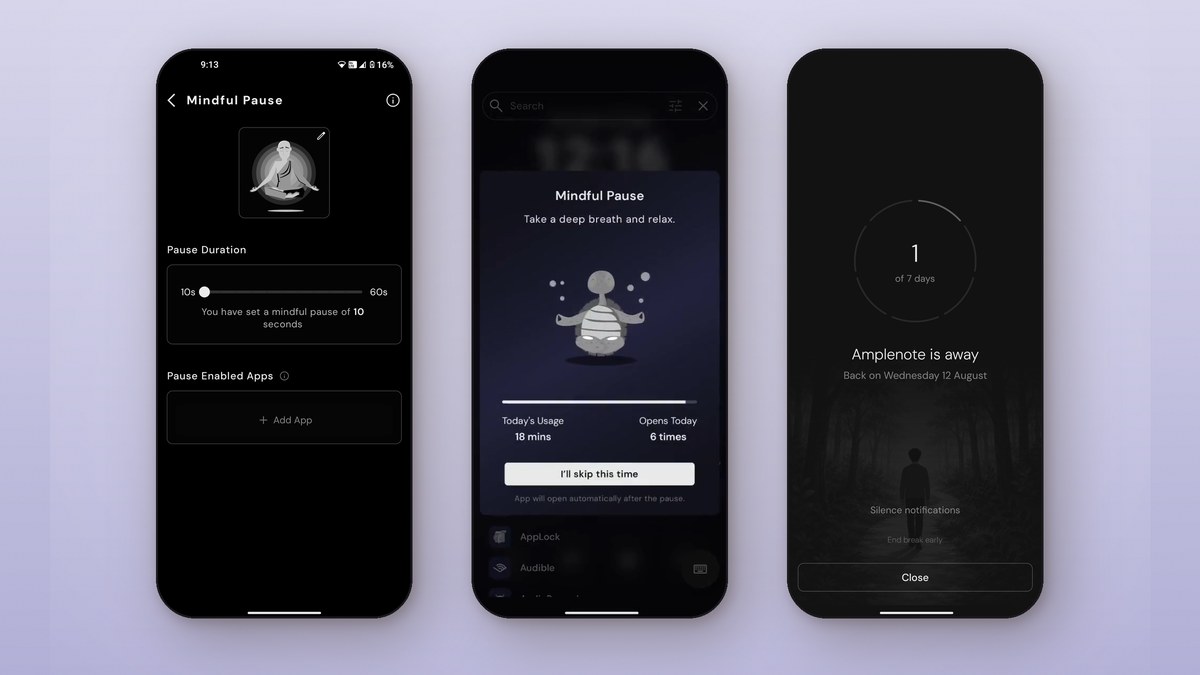
Yin Yang Launcher is a minimalist launcher that helps you use your phone less, and Mindful Pause is its pause before opening. Open a chosen app from the home screen, app drawer or search, and Mindful Pause shows a breathing guide with a countdown. You set the countdown between 10 and 60 seconds. You wait it out and the app opens, or close it and you’re back on your home screen. To set it up:
- Install Yin Yang Launcher (Android 12 and later) and set it as your home screen.
- Swipe left to open Mind Space, open the Action tab and tap Mindful Pause.
- Under Paused apps, tap Add more, choose your apps and tap Select.
- Set the Pause Duration, then tap the breathing guide to pick one.
Our Mindful Pause guide shows each step with screenshots.
Separate pause apps
Separate apps add the same kind of pause on top of the launcher you already use. one sec runs on Android and iPhone and adds a breathing pause before the apps you pick. Pause on F-Droid is an open-source app that shows a countdown, then lets you open the app anyway or cancel. It never connects to the internet. Both use Android’s accessibility service to notice when a chosen app opens.
Google has also built a similar pause, Pause Point, into Android 17, but only on the Pixel 11 series so far.
How long should the pause be, and which apps should get one?
A short pause of about 10 seconds is a good start, and the apps that deserve one are those you open without deciding to. If you find yourself opening an app straight through the countdown, a longer pause gives you more time to notice. A 2023 field study looked at the one sec app, which uses a 10-second pause. Participants closed the app instead of continuing in 36% of attempts. Over six weeks, they also tried to open those apps less often (PNAS, 2023).
A pause on apps you need (maps, banking, your calendar) only slows you down. Pick the two or three apps you reach for out of habit, often social feeds, video and news.
What if a pause isn’t enough?
When a pause isn’t enough, add a limit that holds after the app opens. In Yin Yang Launcher, two more Mind Space tools go further than a pause:
- Mindful Timer gives a group of apps a daily time budget and asks how long each visit should last.
- Focus Mode hides everything except the apps you allow, for a stretch you set.
For a wider look at cutting back, read how to stop doom scrolling on Android.
FAQ
Does pausing an app stop it running in the background?
No. A pause before opening only adds a wait at launch. Focus mode stops you opening the app and silences its notifications; to stop an app completely, use Force stop in Settings › Apps.
Can I skip Mindful Pause?
Mindful Pause has no skip. You wait for the countdown, or close the pause and go back to your home screen.
How long does Mindful Pause last?
Mindful Pause lasts 10 seconds by default. You can set it anywhere from 10 to 60 seconds, in 5-second steps.


[…] Wellness Features: This is where Yin Yang truly differentiates itself from the pack. The signature Mindful Pause feature can set distracting apps (like social media) to launch with a 5-60 second breathing […]