 Yin Yang Launcher
How to stop doom scrolling on Android (without blocking apps)
You tap Instagram "just for a minute" and forty minutes later you can't remember what you were doing. Five tactics that catch the reflex before the scroll begins — without hard blockers or cold turkey.
A practical guide for Android users who have tried app blockers and watched themselves bypass them by day four.
You pick up your phone to check the time. Your thumb finds Instagram without asking. Forty minutes later, you can’t remember what you were doing before.
This is not willpower failing. Americans now check their phones about 205 times a day, up 42% year over year, and the mechanics are well-documented: the feed is a slot machine, infinite scroll never signals “done,” and the reach for the app is reflexive long before the scroll begins.
Below are five tactics that work at different points in the loop — from the notification that triggered the reach, to the pause before the open, to the cap on how long you stay once you’re in. Ranked by effort. No shame, no cold turkey.
Why does doom scrolling happen in the first place?
Doom scrolling is driven by variable-ratio reinforcement — the strongest reinforcement schedule in behavioural psychology, and the same pattern casinos use. Every swipe carries the chance of a reward (a funny post, breaking news, a viral clip), and that uncertainty keeps the brain engaged past the point of intention.
There is a second quirk that makes it hard to stop: the dopamine spike peaks in anticipation of the reward, not after it. The reach for the app is already the hit. By the time you open it, your brain has shifted to maintenance scrolling — looking for the next almost-reward, on repeat.
And the feed itself offers no exit signal. Infinite scroll has no terminal marker — no “done” screen, no completion cue — so the nervous system never gets the disengage signal a book or a TV episode provides.
Doom scrolling starts before you open the app. It starts the moment your thumb decides for you.
Why do app blockers usually stop working after a week?
Most blockers fail in the moment you most need them. Apple’s Screen Time, when your limit hits, offers three buttons: OK, Remind me in 15 minutes, and Ignore for today. Two of those three options let you keep scrolling. Android’s Digital Wellbeing has the same shape.
Third-party blockers patch this with harder restrictions — Accessibility permissions, VPN tunnels, a password you made your partner set. These work until they don’t. The research on screen-time tools lands in the same place: blockers are effective when pre-committed in a calm moment, and brittle the instant you meet them in a tired, low-willpower state.
A block you can override is a block you will override.
The deeper issue is architectural. A blocker intercepts you at the wrong point in the loop — mid-reach, after the anticipation spike has already hit, at maximum impulse. That’s the hardest moment to say no to. It is not that willpower is weak. It is that the intervention is late.
What actually works? Five tactics, ranked by effort
Each tactic targets a different stage of the loop — the external trigger, the visual draw, the reach, the open, and the duration once inside. Start with one. Most readers never need all five.
- Turn off the notification that triggered the reach. Most doom-scroll sessions begin with a push. Open Android Settings → Apps → [app] → Notifications, and disable everything except direct messages. This alone removes a large share of reflex pickups for most users.
- Switch the phone to grayscale. Settings → Digital Wellbeing → Bedtime mode, or Accessibility → Color correction → Grayscale. Colourless icons give the visual reward system nothing to latch onto. It feels strange for a day, then normal.
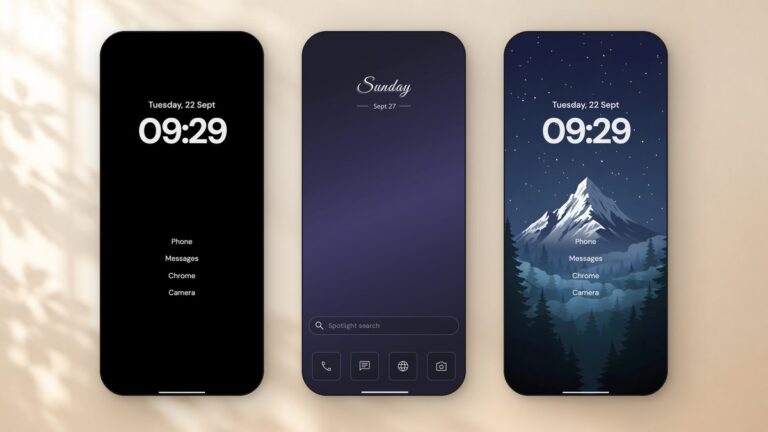
- Move social apps off the home screen. Bury Instagram, TikTok, and Reddit in an app drawer folder, two taps deep. The extra friction is the point — it gives your conscious mind a beat to catch the reflex before the app is visible.
- Put a breathing pause between the tap and the open. This is the highest-leverage intervention, because it intercepts the reach before the dopamine spike completes. A few seconds of breathing after the tap, before the app opens, gives the nervous system the completion cue the feed refuses to provide.
- Set a time cap once you’re in. Even with a pause, some sessions slip. A per-app session cap — say, ten minutes for Instagram — plus a cooldown afterward gives the scroll the “done” signal it is missing. Set the limit in a calm Sunday moment; let it run automatically through the week.
How does a minimalist launcher help with doom scrolling?
Most tactics above can be done with system settings and a little discipline. Tactics 4 and 5 are harder — they need software that sits between the tap and the app.
On Android, this is exactly what a launcher can do, because the launcher is the home screen. When you tap an app icon, the launcher handles the open. A launcher that adds a breathing pause at that moment is intercepting the reach at the earliest, cheapest point in the loop — no Accessibility tunnels, no VPN, no root.
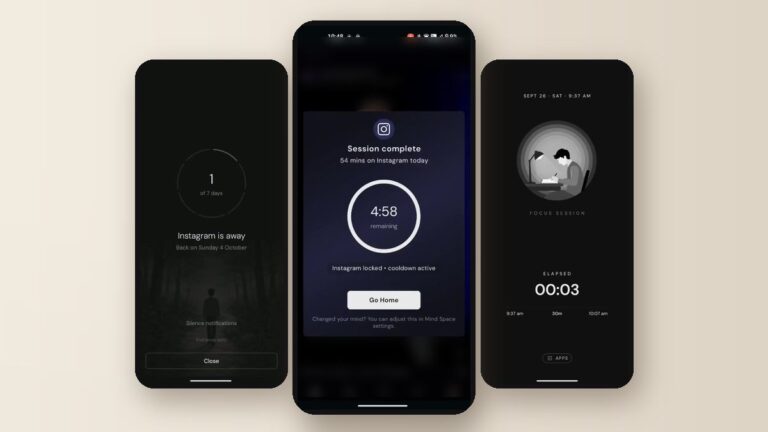
Yin Yang Launcher is built around this idea. Tap a paused app — Instagram, say — and a full-screen breathing animation runs for a few seconds before the app opens. You can wait it out (the app opens normally), or dismiss it (you return to the home screen). The pause duration is yours, from zero to sixty seconds. There is no hard lock, no shame dialog, no password to recover.
The pause is a moment, not a wall. It works because it arrives before the impulse peaks, not after.
It will not stop a determined scroll. That is the point — you are the one making the decision, the pause just makes sure there is one.
What if you already caught yourself scrolling — can you stop mid-session?
Sometimes the pause does not catch it. You open the app, settle in, and the feed does its work. This is where a duration cap earns its place.
Yin Yang’s Mindful Timer lets you group apps (e.g. “Social” = Instagram + Reddit + TikTok), set a shared daily budget, and optionally a per-session cooldown. Open the app, pick a session length — three, ten, twenty minutes, your call — and when time runs out the session ends. The cooldown prevents an immediate reopen.
It is the completion cue the feed refuses to give you.
Unlike a pause, the timer does enforce — when the daily budget hits zero, the group is locked until midnight. You can tap Continue anyway to override, which is recorded but not shamed. The point isn’t to make you fail; it is to make you aware of when you override, because awareness is the precondition for change.
How long until doom scrolling goes away?
Honest answer: it doesn’t. Not the way quitting smoking makes cigarettes disappear.
What changes is the timing. You catch the reach a half-second earlier, then two seconds earlier, then at the thought of the reach before your thumb moves. The pause becomes internalised. The scroll becomes chosen.
You don’t stop doom scrolling. You catch it earlier each time.
The metric that matters is not screen time at zero. It is walk-away rate — the percentage of pauses you dismiss instead of waiting out. That number creeps up over weeks, and the feed slowly loses its grip on the reflex.
Is doom scrolling actually harmful, or is it just a time problem?
Recent research treats it as a public-health concern worth urgent attention — linked to sleep disruption, anxiety, and diminished attention over time. But framing it as a health emergency can backfire. Catastrophising tends to pair with shame, and shame pairs poorly with behaviour change.
The more useful frame: doom scrolling is a design outcome. The apps are built to produce it. You are not broken for experiencing it. The tactics above work because they change the environment, not the person.
Start with one thing
Not five. The notifications tactic is the lowest-effort and highest-payoff — do it today, before anything else. If that is not enough after a week, add the pause.
If you want to try the pause without installing anything else, Yin Yang Launcher is free on the Play Store. No ads, no tracking, no paywall on the core features.
Further reading
- How to use your phone less on Android — includes the grayscale setup behind tactic #2.
- Best minimalist Android launchers — the full roundup for readers comparing options.
- How to pause an app on Android — blocking an app vs adding a pause before it opens.
Sources
- Reviews.org, Cell Phone Usage Stats 2025 — reviews.org/mobile/2025-cell-phone-addiction
- Rowan Center for Behavioral Medicine, The Psychology of Doom Scrolling Explained — rowancenterla.com
- Sharpe & Spooner, Dopamine-scrolling: a modern public health challenge requiring urgent attention, SAGE Journals, 2025 — journals.sagepub.com
- Blok, Why your screen time app isn’t working — blok.so