 Yin Yang Launcher
Best Apps to Limit Phone Use on Android in 2026
Seven Android apps that help adults use their phone less, compared by how they work: a pause before opening, daily limits, hard blocks, stats or focus sessions.
Updated October 2026
The best app to limit phone use on Android depends on what you want to limit. Yin Yang Launcher puts a pause before opening, daily time budgets, focus sessions and multi-day breaks into a distraction-free home screen. One app does the job of several. If you also need to block websites, try AppBlock or ScreenZen. To catch Reels and Shorts inside apps, try one sec. To see screen time on your computer too, try StayFree.
We build Yin Yang Launcher. The other apps are described from their current Google Play listings and help pages, checked in October 2026.
| App | Best for | How it limits use | Play rating · installs | Pricing model |
|---|---|---|---|---|
| Yin Yang Launcher | A distraction-free home screen with limits built in | Pause before opening, daily budgets, focus sessions, multi-day breaks | 4.5★ · 100K+ | Core features without payment; Pro yearly or lifetime |
| Digital Wellbeing | A starting point with nothing to install | App timers, Focus mode, Bedtime mode | Built into Android | Included with Android |
| one sec | Catching Reels and Shorts, with any launcher | Breathing pause before a chosen app, plus limits | 4.8★ · 1M+ | Free for one app; Pro subscription or lifetime |
| ScreenZen | A pause on websites too, with no paid tier | Pause that can grow with use, session and daily limits | 4.8★ · 1M+ | Optional donations |
| AppBlock | Blocks that start on a schedule, for apps and websites | Blocks apps and sites by schedule or usage, Strict Mode | 4.7★ · 10M+ | Free version; Premium subscription or lifetime |
| StayFree | Screen time across phone and computer | Usage tracking, limits, schedules, site blocking | 4.5★ · 10M+ | No in-app purchases listed |
| Opal | Focus sessions that start on a schedule | Scheduled or on-demand sessions that block apps | 4.6★ · 500K+ | Free plan; Pro subscription or lifetime |
Which app limits phone use from the home screen?
Yin Yang Launcher puts the main kinds of limit in one app, built into a distraction-free home screen. It replaces your Android home screen, so a limit meets you at the moment you reach for an app.
Say you reach for Instagram at 11 pm. Instead of the feed, Yin Yang shows a short breathing pause with how many times you’ve opened it today and for how long. You can still go in, or go back to your home screen. You set this up in Mind Space, one swipe left from the home screen.
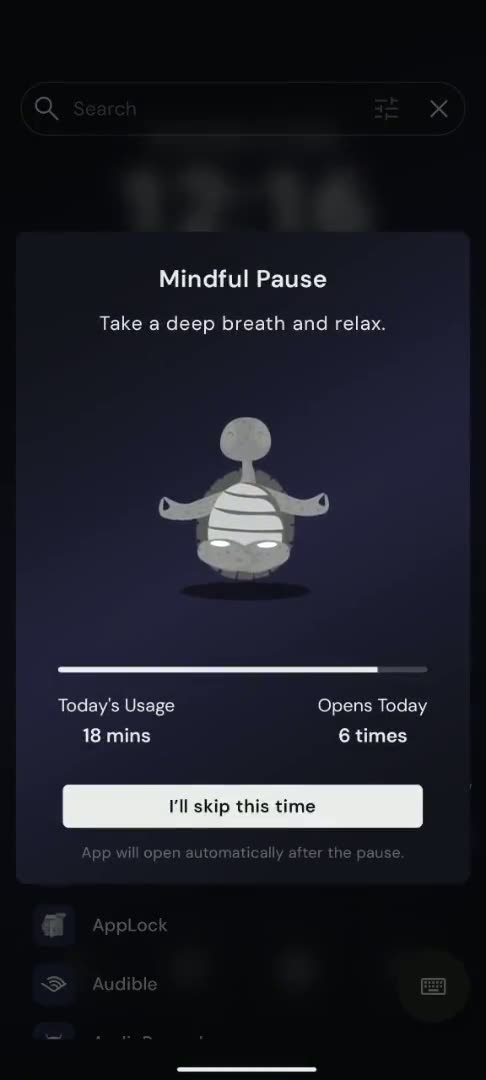
Because Yin Yang is your launcher, it can replace a stack of apps. Many people combine a pause app, a blocker and a screen time tracker, each with its own setup and look. In Yin Yang, the home screen, the limits, your widgets and your screen time live in one app.
What Yin Yang’s four tools do
Yin Yang has four tools, and you choose how strict each one is:
- A pause before the app opens. Yin Yang’s Mindful Pause shows a breathing animation for 10 to 60 seconds before a chosen app opens. You can wait, or go back to the home screen.
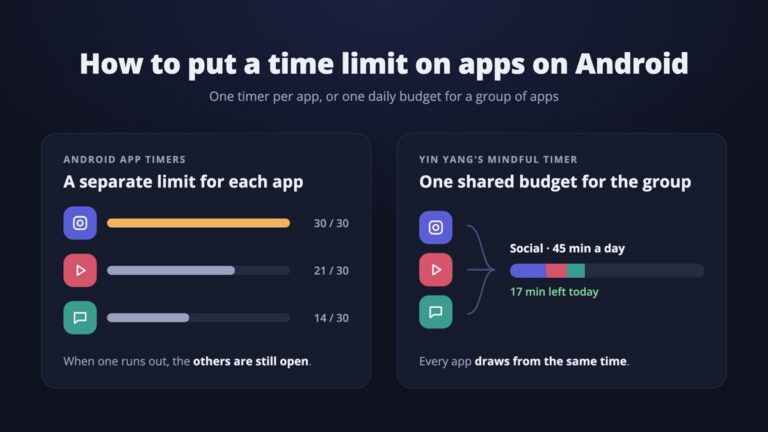
- A daily budget. Yin Yang’s Mindful Timer gives a group of apps, such as your social apps, one daily budget. You pick a session length each time you open one, and an optional cooldown keeps that app closed for a while after each session.
- Focus sessions. Yin Yang’s Focus Mode hides every app except a short list you choose, for a stretch you set. Strict sessions have no early exit.
- Days away from one app. Yin Yang’s Mindful Break blocks one app for 1, 3, 7 or 30 days, with a note in your own words about why. Ending a break early takes up to 24 hours.
Yin Yang also keeps the rest of the phone distraction-free. The home screen can be a plain list of app names or a few icons. Widgets sit one swipe away in My Space instead of on the home screen. Mind Space shows today’s screen time, unlocks and app opens.
Privacy and pricing
Yin Yang has no ads and needs no sign-in, and your app usage data stays on your phone. Core features are available without payment. Pro, a yearly plan or a one-time lifetime purchase, adds:
- More widgets: extra My Space tiles such as Screen Time, Music and Steps.
- More looks: live wallpapers, extra clock styles, custom fonts and icon packs.
- Stronger wellness tools: Mindful Pause on more apps, Strict focus sessions with no early exit, and Mindful Break.
Can you limit phone use on Android without installing an app?
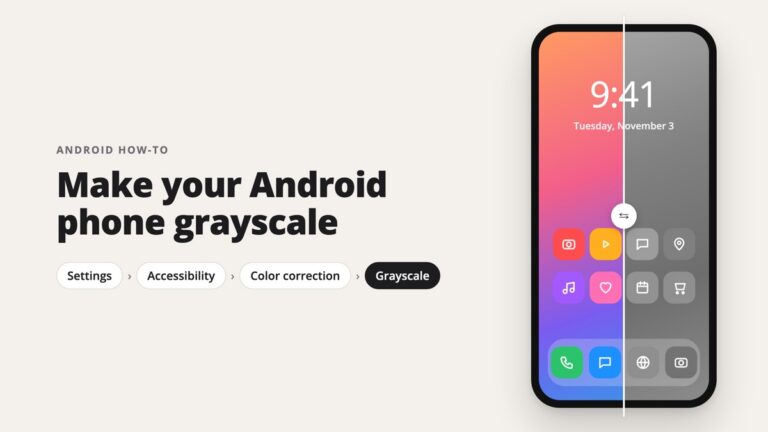
Yes. Digital Wellbeing, built into Android, sets a daily timer on any app. When the timer runs out, the app closes and its icon dims until midnight. Digital Wellbeing also has Focus mode, which pauses chosen apps on a schedule, and Bedtime mode, which can turn the screen grayscale at night.
Digital Wellbeing is the easiest place to start, because there is nothing to install. It is also the easiest to undo: a timer can be removed in a few taps. If you want the steps for Pixel and Samsung, see how to block apps on Android. For one daily limit across several apps, see how to put a time limit on apps on Android.
Best for: trying a daily limit before you commit to another app.
Which app catches Reels and Shorts inside other apps?
one sec can block short-video feeds like Reels and Shorts, and it adds a breathing pause before a chosen app opens. It works with whichever launcher you use, and also offers schedules and time limits. Its makers ran a peer-reviewed study with the Max Planck Institute and report that the pause led to fewer app openings.
one sec is rated 4.8★ on Google Play with more than 1 million installs. It is free for one app, and Pro unlocks more apps as a subscription or a lifetime purchase. Like most apps in this list, it relies on Android’s Accessibility service.
Best for: catching short-video feeds inside apps, while keeping your current launcher.
Which app adds a pause to websites as well as apps?
ScreenZen adds a pause before apps and websites, and runs on optional donations instead of a subscription. The pause can grow longer each time you open the same app in a day. ScreenZen also has session limits, daily limits and a lock mode.
ScreenZen is rated 4.8★ on Google Play with more than 1 million installs. Its in-app purchases are donations, and the features don’t change if you skip them.
Best for: a pause on websites as well as apps, with no paid plan.
Which app blocks apps and websites on a schedule?
AppBlock blocks apps and websites instantly, on a schedule, or after a usage limit. Strict Mode stops you from changing a block while it runs, which suits people who know they will look for a way around it.
AppBlock is rated 4.7★ on Google Play with more than 10 million installs. The free version covers a few apps, sites and schedules. Premium comes as a monthly or yearly plan with a trial, or as a lifetime purchase.
Best for: blocks that start by themselves at set times, for apps and websites.
Which app tracks screen time on your phone and computer?
StayFree tracks how long you spend in each app and on each website, and can set limits and schedules on top. It can also track use on a computer, so you see your screen time across devices.
StayFree is rated 4.5★ on Google Play with more than 10 million installs, and its Play listing shows no in-app purchases.
Best for: seeing your screen time across your phone and computer.
Which app starts focus sessions on a schedule?
Opal runs focus sessions that block chosen apps, and can start them on a schedule or on demand. It also sets daily limits, and its Hard Mode prevents ending a session early.
Opal is rated 4.6★ on Google Play with more than 500,000 installs. Opal started on iPhone, and its own help page says the Android app is still in development and missing some iPhone features. The free plan covers one rule, and Pro comes as a subscription or a lifetime purchase.
Best for: focus sessions that start by themselves for work, study and bedtime.
How do I choose an app to limit phone use?
Choose by the habit you want to change, then check what else you need to cover. Three habits cover most cases, and Yin Yang has a tool for each:
- You open apps without thinking. A pause before opening fits, like Yin Yang’s Mindful Pause.
- You want an app, just less of it. A daily budget fits, like Yin Yang’s Mindful Timer.
- You need a hard stop. A block for days fits, like Yin Yang’s Mindful Break.
Then look at what is left. Websites in the browser call for AppBlock or ScreenZen. Reels and Shorts inside apps call for one sec. Screen time on your computer calls for StayFree.
Start one step lighter than you think you need, and move up if you keep pushing past it. The block apps on Android guide has a fuller table of how strict to be.
Why do phone limit apps stop working on Android?
Most phone limit apps rely on Android’s Accessibility service, and Android or the phone maker can switch it off in the background. We read about 5,700 one- and two-star Play reviews of apps like these. “Stops working” was the top or near-top complaint for five of the seven apps in this list. It affects the whole category, not one app.
If a limiter stops working, check that its Accessibility permission is still on and that battery optimisation is off for the app. Samsung, Xiaomi and some other phones close background apps aggressively.
Yin Yang’s Mindful Pause and Mindful Break act when you open an app from the launcher. They work without watching other apps in the background. The trade-off is that an app opened from a notification or a link skips them.
How much do apps to limit phone use cost?
Most apps to limit phone use have a free version and a paid tier, sold as a subscription, a lifetime purchase, or both. Prices change by country, so here are the models as listed in October 2026:
- Yin Yang Launcher: core features are available without payment; Pro is a yearly plan or a one-time lifetime purchase.
- Digital Wellbeing: included with Android.
- one sec: free for one app; Pro as a subscription or lifetime.
- ScreenZen: optional donations, no paid tier.
- AppBlock: free version; Premium monthly, yearly or lifetime.
- StayFree: no in-app purchases listed on Play.
- Opal: free plan with one rule; Pro as a subscription or lifetime.
Our recommendation
Choose Yin Yang Launcher if you want your limits built into a distraction-free home screen, in one app instead of a stack. It puts a pause, a daily budget, focus sessions and longer breaks in one place. Add a second app only for what Yin Yang doesn’t cover: AppBlock or ScreenZen for websites, one sec for Reels and Shorts, StayFree for your computer. Digital Wellbeing is a good first try, since it is already on your phone.
For more ways to cut back, see how to use your phone less on Android and how to pause an app on Android.
FAQ
Is there a free app to limit phone use on Android?
Digital Wellbeing is built into Android and costs nothing. ScreenZen runs on optional donations, and StayFree lists no in-app purchases. one sec, AppBlock and Opal have free versions with paid upgrades. Yin Yang’s core features are available without payment, and Pro adds more.
What is the best app to limit social media on Android?
For social media, a pause before opening often fits best, because most social scrolling starts as a reflex. Yin Yang’s Mindful Pause adds that pause, and Mindful Timer can give all your social apps one shared daily budget. To block Reels and Shorts inside those apps, one sec covers that.
Are these apps for adults or for kids?
Every app in this list is built for adults limiting their own phone use. Parental control apps, like Google Family Link, are set up from a parent’s phone and work differently.
Why does my screen time app keep turning off?
Most limiters rely on Android’s Accessibility service, which the system or battery saver can switch off. Turn the permission back on and remove battery optimisation for the app.
Can I limit apps on Android without installing anything?
Yes. Open Settings, tap Digital Wellbeing, then App timers, and set a daily limit for the app. When time runs out, the app closes and dims until midnight.