 Yin Yang Launcher
How to Put a Time Limit on Apps on Android
Put a daily time limit on any app with Android's app timers, or give a group of apps one shared budget with a session length you pick each time.
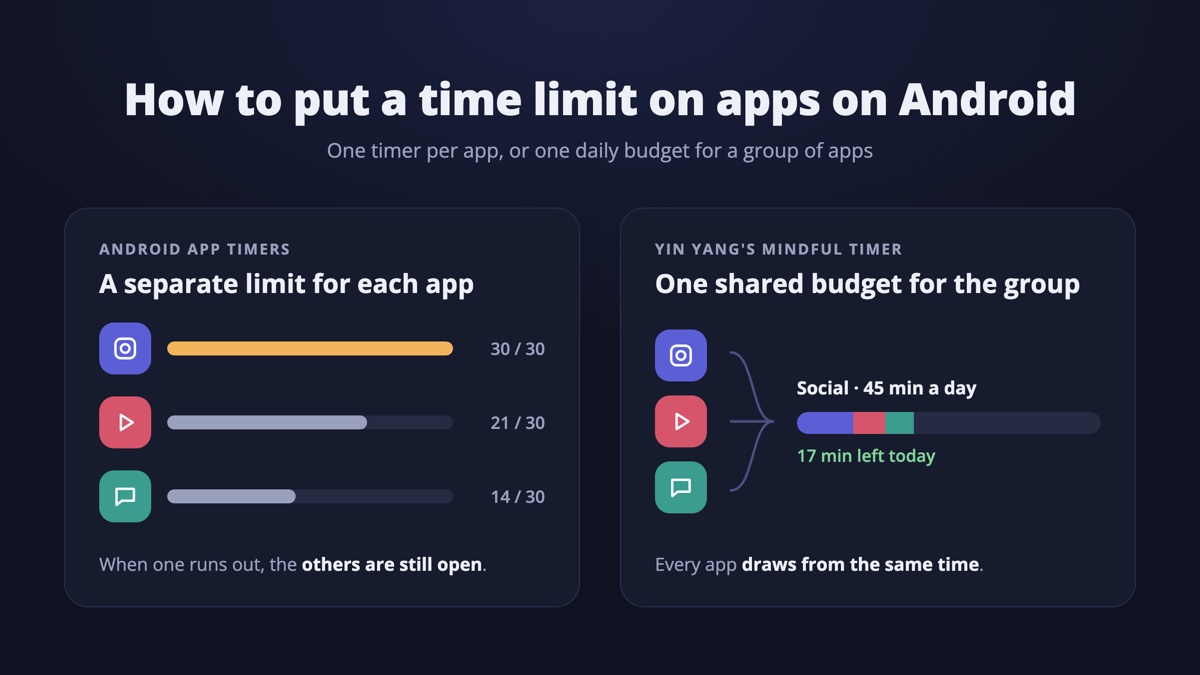
To put a time limit on an app on Android, open Settings and tap Digital Wellbeing. Then tap App timers and set a daily limit next to the app. When the time is up, the app closes and its icon dims until midnight. Android limits each app on its own. To share one daily budget across a few apps, Yin Yang Launcher’s Mindful Timer groups them. It asks how long you want each time you open one, and can keep the app closed for a cooldown after each session.
How do you set an app timer on Android?
Android’s built-in time limit is an app timer in Digital Wellbeing. It sets a daily limit for one app at a time.
On a Google Pixel:
- Open Settings and tap Digital Wellbeing.
- Tap App timers.
- Tap the timer icon next to the app.
- Choose the time and tap OK.
On a Samsung Galaxy:
- Open Settings and tap Digital Wellbeing and parental controls.
- Tap App timers.
- Pick the app and tap Set timer.
- Choose the time and save it.
Menu names change between Android versions and phone makers. If a step reads differently on your phone, look for “App timers”.
What happens when an app timer runs out?
When an Android app timer runs out, the app closes and its icon dims for the rest of the day. Tapping the dimmed icon doesn’t open the app. App timers reset at midnight, so the full limit comes back the next day.
To use the app again before midnight, you delete its timer on the App timers screen. On a Pixel, an App limits PIN means the limits can only be changed with that PIN. Set it in Digital Wellbeing under App limits, then App limits PIN.
Why doesn’t one app timer cut total screen time?
An Android app timer counts one app, so when it runs out, the time often moves to the next app. A limit on Instagram leaves TikTok, YouTube and Reddit open, and the day’s total barely changes.
Two other things wear a limit down. Deleting a timer takes a few taps, so the limit is easy to undo. A daily limit is also one long stretch. Thirty minutes of Instagram can go in a single sitting before lunch, and then the app is locked for the rest of the day.
How do you set one time limit for several apps?
Android’s app timers can’t share one limit across several apps, because each timer counts one app. Yin Yang’s Mindful Timer gives a group of apps one shared daily budget instead. You might put Instagram, TikTok and YouTube in a group called “Social”, with a budget anywhere from 5 minutes to 6 hours. Time in any of those apps comes out of the same budget.
When you create a group, Mindful Timer suggests a budget a little below your average for those apps over the last seven days. That way the first limit starts close to how you use them now.
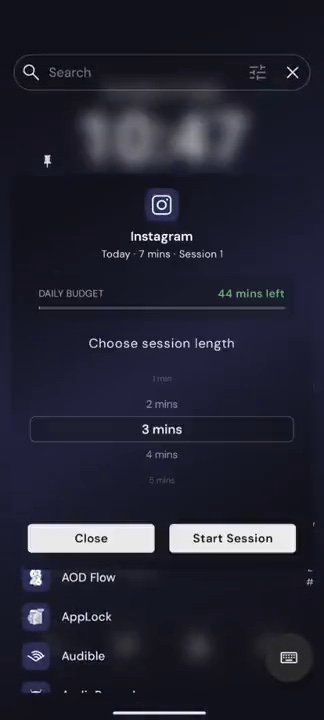
Mindful Timer also splits the day into sessions. Each time you open an app in the group, Yin Yang asks how long you want, from 1 to 60 minutes. When the session ends, an optional cooldown keeps that app closed for a while, and the cooldown can’t be skipped. When the daily budget is used up, every app in the group stays closed until midnight. A Continue anyway button is there for the days you need it.
To set it up:
- Install Yin Yang Launcher and set it as your home screen.
- Swipe left to open Mind Space, open the Action tab and tap Mindful Timer.
- Tap +, name the group and add the apps.
- Set the Total budget under Daily Limit, and pick a Cooldown under Per Session, or leave it Off.
- Tap Save, and allow display over other apps if asked.
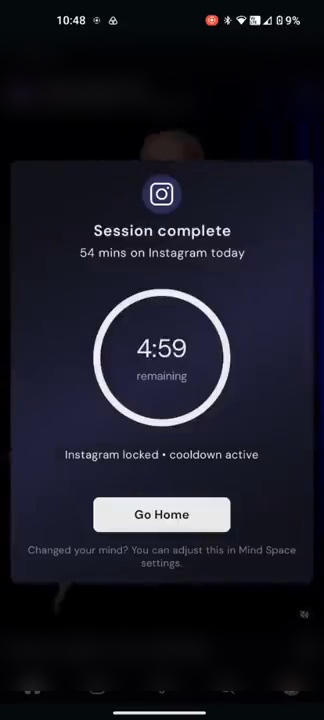
Does Yin Yang’s Mindful Timer count opens from notifications?
Yes. With Yin Yang Launcher as your home screen, Mindful Timer counts opens from Recents, notifications and links, not only taps on the home screen. Every route into the app goes through the same question about how long you want.
Mindful Timer counts only the time an app is on screen. Switching to another app pauses the session, so time with the app in the background doesn’t use the budget.
What if a daily time limit isn’t enough?
If a daily limit is used up by noon most days, a stronger step may fit that app better. Yin Yang’s Mindful Break blocks one app for 1, 3, 7 or 30 days. For apps you open without thinking, a short pause before the app opens may fit better. How to block apps on Android compares those strengths side by side.
For dedicated limit apps, see the best apps to limit phone use on Android. For a wider plan, read how to use your phone less on Android.
FAQ
How do I remove a time limit on an app on Android?
Open Settings, tap Digital Wellbeing, then App timers, and delete the app’s timer. For Yin Yang’s Mindful Timer, open it in Mind Space and change the group’s budget or remove the app from the group.
Why is my app timer not resetting?
Android app timers reset at midnight by the time on your phone. If a timer stays on after midnight, check that the date and time settings are correct, then delete the timer and set it again.
Can I lock app timers with a PIN?
On a Pixel, yes. Open Digital Wellbeing, tap App limits, then App limits PIN, and turn on the PIN for app time limits.
Can I set app time limits for my child?
Use Google Family Link from a parent’s account, which sets daily limits on a child’s apps. Yin Yang Launcher is built for adults setting limits for themselves.
Does Mindful Timer count time when the app is in the background?
No. Yin Yang’s Mindful Timer counts only while the app is on screen, and switching away pauses the session.